
Top Step’s Top 5 Features of the SuiteProjects Pro October 2025 Release
Building on the momentum of one of SuiteProjects Pro’s most popular features among end users in recent releases, the Project Center, the SPP 2025.2 release unveils a brand-new Resource Center and delivers enhanced tools for communication, analytics, and streamlined workflows across the system. To be rolled out into all SPP production environments on October 11th, here are Top Step’s picks for the Top 5 features of the Oracle NetSuite SuiteProjects Pro October 2025 release:
1. Resource Center
The new Resource Center provides a centralized hub for resource managers to track and perform a variety of resource allocation activities in one place. Similar to the Project Center, the Resource Center features a customizable booking grid with weekly or monthly view options and direct, inline-editing capabilities. However, unlike the Project Center, the Resource Center is not project-specific and allows you to get a holistic view of booking data at the level of your choice—organization-wide, by specific user(s), client(s), project stage, etc.—by utilizing advanced filters.
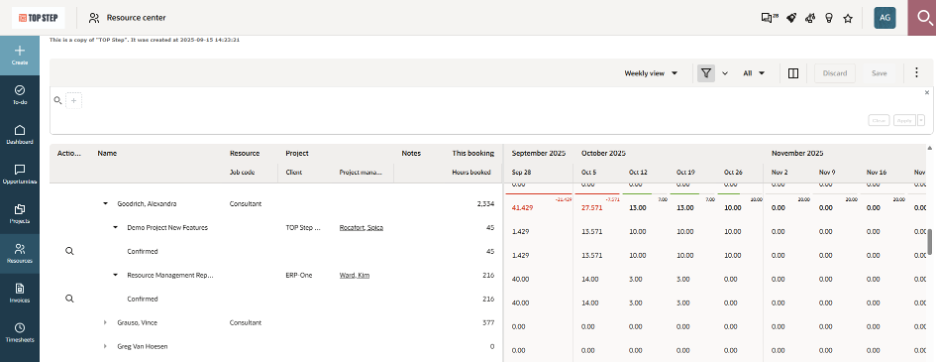
On the left side of the page is the resource/project information, and you can drill down by Resource, Project, Task, Job Code (if applicable), and Booking Type. The right side of the page contains the booking grid which shows the number of booked hours at each drilldown level in the week or month column indicated.
The Resource Center is an optional feature that must be requested by an administrator via SuiteProjects Pro Support. Once the feature is enabled, it is located under the Resources module > Resource Center, and account admins can grant access to non-admin users via role permissions.
Direct inline edits can only be made at the lowest drilldown level (Booking Type), and thus the internal switch “Require booking type when booking resources” must be enabled to use the Resource Center. Other things you can do within the Resource Center include:
- Add, remove, and adjust the width of columns on the page
- Make changes to booked hours and either copy/paste values into multiple cells or use the drag and fill functionality by dragging the corner of any cell across the grid
- Directly inline edit Booking Type and Notes fields
- Use the magnifying glass in the leftmost Actions column to search for and select a resource to reassign all bookings in the row
- Resource Name is the only option available in the search function currently
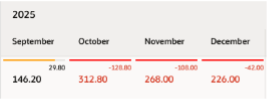
- View color-coded overbooked warning indicators in the top-right corner of each booking cell when a row is selected
2. Enhancements to Project Discussions
Project Discussions were added to SuiteProjects Pro in the 2025.1 release and now include several improvements for 2025.2, such as the ability to reply within threads, format text styles, and track unread messages.
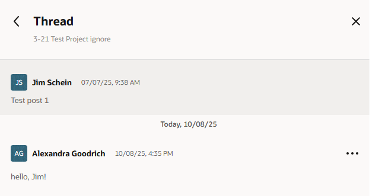
Reply in Thread
- Start a thread by clicking the Reply icon next to the original message
- Replies can be edited or deleted (by authors or admins only)
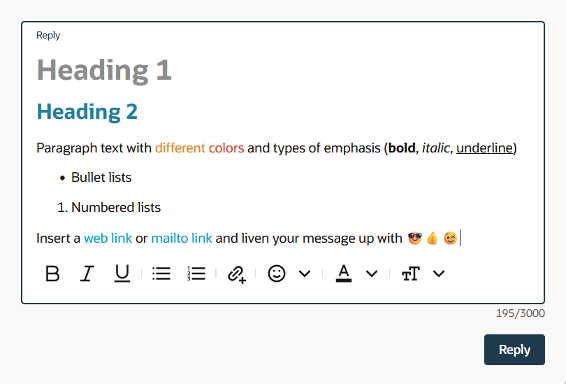
Rich Text Capabilities
Unread Messages
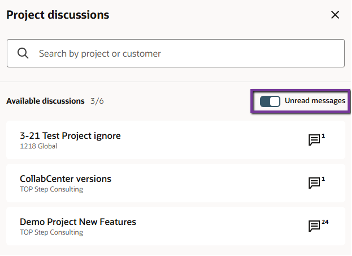
- You can toggle the “Unread messages” switch to view ALL project discussions with currently unread messages
- Within a specific project, you can easily differentiate between Unread Messages and All Messages by toggling the appropriate tab:
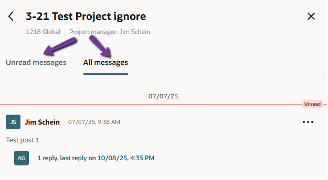
- Click the three dots icon next to any message to mark it as read/unread
If you have not yet enabled Project Discussions, admins can do so via Administration > Application Settings > Projects > Other Settings > “Enable project discussions.”
3. To-Do Widget in SuiteProjects Pro Mobile 5.3
SPP Mobile 5.3 includes a couple of new features, but our favorite is the To-Do Widget. With this widget added to your home screen, you can easily view an up-to-date list of any SuiteProjects Pro items that require your action without even opening the app. Simply tap the widget to jump straight to your to-do list within SPP.
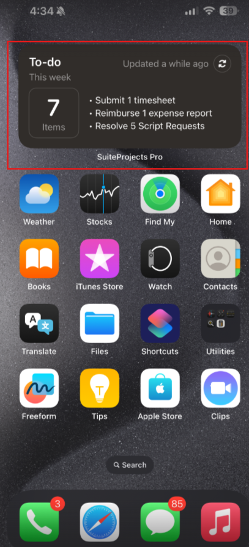
To add the To-Do Widget to your device, tap any blank space on the home screen, then Edit (on iPhone) or Widgets (on Android), search for the SuiteProjects Pro to-do widget, and tap to add it to your home screen.
4. Generative AI via “NetSuite Expert” in SuiteAnswers
If you use NetSuite in addition to SuiteProjects Pro, you may already be familiar with the NetSuite Expert Generative AI feature located in SuiteAnswers. However, with the 2025.2 release it is now extended to all SuiteProjects Pro customers.
After typing 3 or more words into the search bar in SuiteAnswers, NetSuite Expert will automatically generate a summarized response using AI above the list of results.
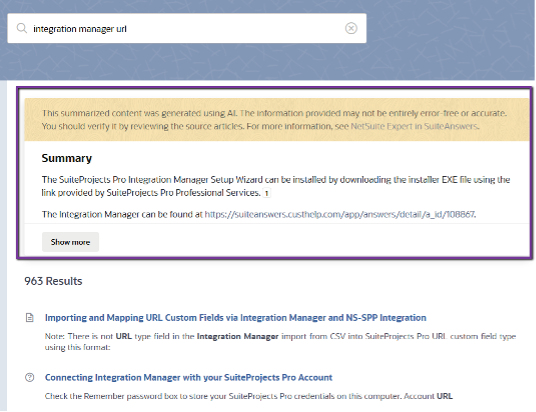
As with any generative AI, the information provided is not guaranteed to be free of errors and should be vetted for accuracy, but this nifty little feature can certainly come in handy at times when it saves you the hassle of scrolling through multiple search results to locate the desired information.
5. Expanded Global Search
SuiteProjects Pro continues to expand its Global Search functionality with this latest release. Global Search now supports the ability to include Contact and Guest User objects in the optional global search coverage criteria, and allows users to search by date, expense report tracking number, and assignment group name.
One last thing that we like about the latest and greatest Global Search is the inclusion of the Project Discussions icon next to a project, which allows you to navigate directly to the project discussions for that project when you click on it.

To access the full list of features from the October 2025 release, click on the “What’s new” rocket icon (located at the top righthand corner of any page while logged into SuiteProjects Pro), then “Read More.”
As with any new release, UI, or features, it is recommended that extensive sandbox testing is completed in your account prior to making any changes in production. Download our eBook to learn more about UI4 and the redesigned user experience.
Contact Top Step if you need assistance implementing any of the new features mentioned in our blog or if you want to learn more about other newly introduced features of the Oracle NetSuite SuiteProjects Pro 2025.2 release.

