
Top Step’s Take on the SuiteProjects Pro October 2026 Release
This fall’s release of SuiteProjects Pro (SPP) builds on the AI-powered Project Summary feature introduced in April, making summaries easier to manage and share. It also brings a refreshed Redwood experience and updates to the NetSuite integration, including support for NetSuite Next.
Here is Top Step’s take on the SuiteProjects Pro Fall 2026 release features, now live in production accounts as of October 10, 2026.
Project Summary Updates
For accounts that already have the AI-generated Project Summary feature enabled, there are two notable enhancements.
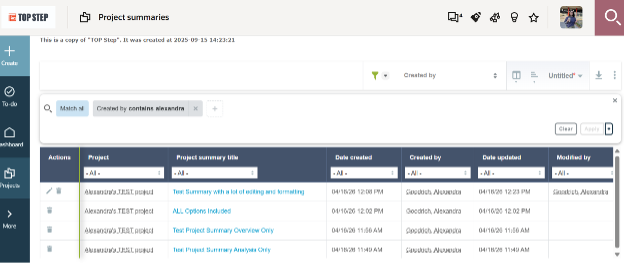
A dedicated list view. Project summaries now have their own list page under Projects > Project Summaries, giving you a tabular view of every existing project summary in one place. As with other SPP list views, you can add or remove columns to tailor the view, apply advanced filter criteria to narrow the list, and export or download the results.
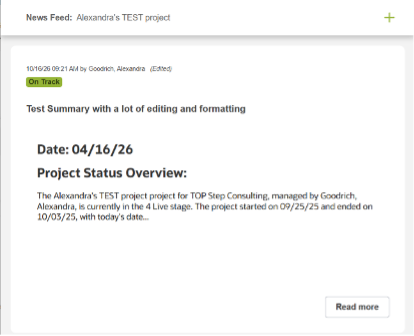
Share summaries to the project news feed. If you have both the Project Summary and Project Status Newsfeed features enabled, you can now share a project summary as a status update in the project news feed. When shared, SPP creates the status update automatically:
Title: the project summary title
Status update: the project summary content
Status: none
From there, you can update the news feed status to reflect where the project stands, such as Needs Attention, On Track, or Completed. It’s a simple way to turn a generated summary into a visible update for your team and stakeholders without retyping anything. As always with AI-generated content, review the summary for accuracy before sharing it.
Oracle Redwood UI Update
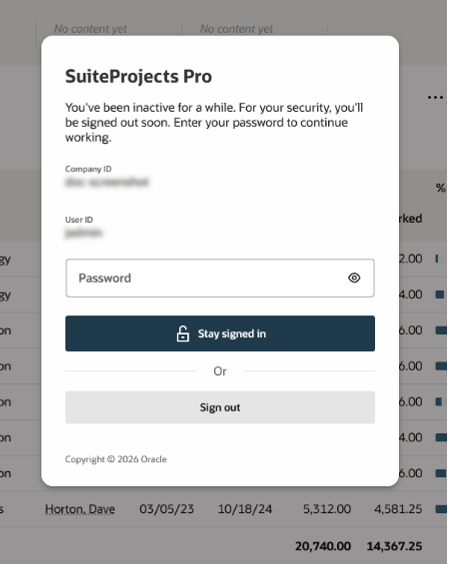
Updated inactivity lock overlay. When a session times out, the inactivity lock screen now displays in Oracle Redwood, SPP’s modernized user interface, for a more consistent look and feel.
NetSuite Integration Updates
Lastly, there are two updates in this release for customers using the SPP NetSuite integration.
Background custom field synchronization. NetSuite custom fields now sync in the background through the NetSuite Connector. A notification appears when the synchronization is complete, so you can continue working instead of waiting on the sync screen.
Support for NetSuite Next. SPP now supports integration with NetSuite Next. Announced by Oracle at SuiteWorld 2025, NetSuite Next is the latest evolution of the NetSuite platform, with AI built in throughout. It isn’t a separate product or a rebuild: it’s an experience layered onto existing NetSuite accounts, which Oracle has described as a push-of-a-button upgrade that keeps your existing workflows and customizations. It runs on Oracle Cloud Infrastructure, adopts Oracle’s modern Redwood design, and is rolling out first to customers in North America.
To access the full list of features from the Fall 2026 release, click on the “What’s new” rocket icon (located at the top right-hand corner of any page while logged into SuiteProjects Pro), then “Read More.”
Contact Top Step if you need assistance implementing any of the new features mentioned in this article or if you want to learn more about other newly introduced features of the Oracle NetSuite SuiteProjects Pro 2026.2 release.

