
Why Don’t My Projected Hours Match My Booked Hours?
If you’ve ever wondered why your projected hours derived from bookings don’t match your booked hours in SuiteProjects Pro, you’re not alone.
Charge projections use bookings (depending on your charge projection setting such as Booked, Worked and Booked, or Approved and Booked), but they are calculated on a per day basis. The system breaks down bookings into daily values first, and those daily bookings are what drive the projected hours. Because of this, the totals may not always align one to one.
Here’s a simple example of how this works:

As an example for Rocafort, Spica on Task 1, the user is booked for 40 hours (22.73 percent of time) in March and 35 hours (19.89 percent of time) in April.
To get the booking per day, multiply the percentage of time by the user’s daily work hours based on work schedule of 8 hours:
- March: 0.2273 × 8 = 1.8184 hrs/day
- April: 0.1989 × 8 = 1.5912 hrs/day
In charge projection, the hours are first converted to minutes, rounded to the nearest whole number, then converted back to hours and rounded to 2 decimal places to get the per day projection:
- March: 1.8184 × 60 = 109.104 → 109 mins → ÷60 = 1.8167 → 1.82 hrs/day
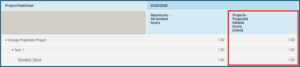
- April: 1.5912 × 60 = 95.472 → 95 mins → ÷60 = 1.5833 → 1.58 hrs/day
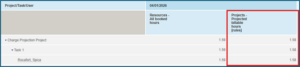
To get the total projected hours per month, multiply the converted hours before final rounding by the number of working days, then round again to 2 decimal places:
- March: 1.8167 × 22 = 39.9674 → 39.97 hrs
- April: 1.5833 × 22 = 34.8326 → 34.83 hrs

For booking hours, since there is no minute conversion, it is calculated directly:
- March: 1.8184 × 22 = 40.0048 → 40 hrs
- April: 1.5912 × 22 = 35.0064 → 35 hrs
This is why there are slight differences between booking hours and projected hours. Projections apply rounding at the daily level before totaling, while booking hours are calculated directly at the monthly level.
Key takeaway: Even when projections come from bookings, daily rounding can cause small differences in the final totals.

