
Using Multi-Week Work Schedules in SuiteProjects Pro
Organizations often employ team members who work different hours each day or follow alternating weekly schedules. To accommodate these more complex patterns, SuiteProjectsPro offers multi-week work schedules, allowing you to define up to eight weeks of varying work hours and cycle them automatically. This makes planning, reporting, and resource management far more accurate for teams with non-standard schedules.
Enabling Multi-Week Work Schedules
To activate this feature, navigate to:
Administration > Global Settings >Account >Optional Features
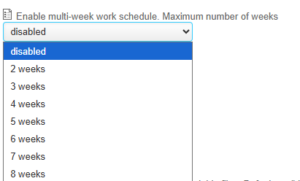
Standard vs. Multi-Week Schedules
A standard work schedule typically looks like this:
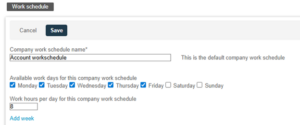
Once you enable the multi-week option, the interface allows you to Add Week, making it simple to configure additional patterns:
Example Use Case
Consider a part-time employee who works:
-
Week 1: Tuesday and Thursday
-
Week 2: Monday, Wednesday, and Friday
Using multi-week work schedules, you can set up a two-week cycle that accurately reflects their availability.
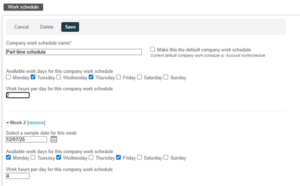
Reports will show the Resource – Work schedule hours based on this two-week schedule.


