
SuiteProjects Pro’s Customizable Next-Generation Homepage
SuiteProjects Pro introduces an enhanced homepage, available alongside the classic version, designed to elevate the user experience. This next-generation homepage offers a customizable interface that improves productivity and efficiency. Users can personalize their homepage with relevant lists and reports, making it easy to access key information—such as projects—and track progress in real time for a more seamless and optimized project management experience.
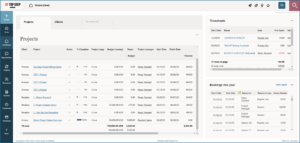
To enable this feature, contact SuiteProject Pro support and request to: Enable the next-generation homepage.
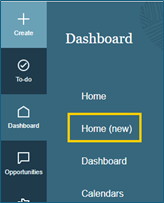
Once enabled, the “Home (new)” will appear in the side navigation of Dashboard.
The primary content area in the top-left corner of your canvas allows you to explore data across up to 10 tabs. The secondary content regions, located to the right of the primary content area, allow you to view two additional sections of information that remain visible on your homepage at all times.
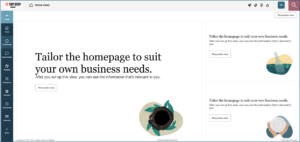
Currently the next-generation homepage supports two types of content:
- List – Homepage lists differ from full-page list views in several ways: the toolbar, page navigation, and bulk action columns are not shown. However, the Actions column is available, allowing users to run reports directly. Lists on the homepage have a distinct visual style and are limited to one page of data, with a visible total row at the bottom. Inline editing is not supported, and changes to the full-page list setup do not affect homepage lists.
- Report – You can display data from one of your reports on your homepage. Reports on the homepage have a different visual style, and if color-coding is used, the legend appears in the bottom-right corner. Click “View report” to access the full report, and use the back link to return to the homepage.
The next-generation homepage can be copied to other users using the Bulk User Change Wizard feature.
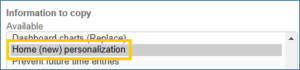
Note: If a report on your portlet is not shared with other users, they will not be able to view the report even if you copy your new homepage to them. A message will appear stating, “We couldn’t find the data source for this portlet.”
In conclusion, the next-generation homepage is an essential tool, especially for Project Managers and Resource Managers. It provides easy access to Quickviews and other personalized data, streamlining workflows and enhancing productivity. With its intuitive design and customizable features, this homepage is a key asset for efficient project and resource management.
More information about this feature can be found on SA: 109850 and 109855

