
SuiteProjects Pro: Project Discussions Feature – Enhancing Team Collaboration
As part of the April 2025 release, SuiteProjects Pro introduced the “Project Discussions” feature, an enhancement that provides a centralized, persistent communication hub for each project. This feature enhances team collaboration by improving information sharing, reducing miscommunication, and creating a permanent knowledge repository that supports better project outcomes.
Project Discussions allow project team members to share a discussion board specific to each project where they can post messages, ask questions, and share answers about project-related topics. Unlike email chains or separate messaging platforms, these discussions are integrated directly into your project management workflow and remain accessible throughout the project lifecycle.
Accessing Project Discussions
The Project Discussions feature is available throughout SuiteProjects Pro, not just on the Project Properties page, ensuring they are always readily accessible to team members. Project Discussions can be accessed through an icon in the top right section of any SuiteProjects Pro page.

Clicking this icon displays a comprehensive list of all available project discussions to which the logged-in user has access. A particularly useful feature is the notification system: an icon next to each discussion shows the number of messages in that discussion thread that are unread by the user, helping team members stay current on project communications.
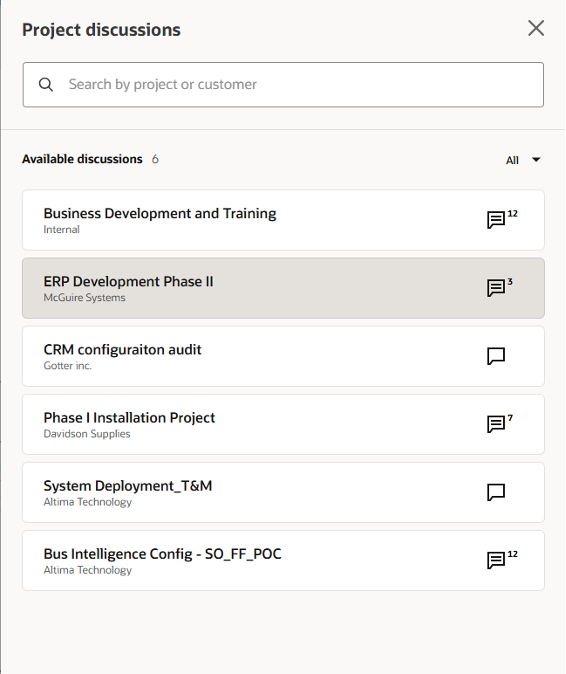
Discussion Thread Functionality
Selecting a discussion from the list reveals all messages in that discussion thread, along with a text box that allows users to add new messages. The interface includes robust message management capabilities: an ellipsis menu (three-dot icon) appears next to each message, allowing the original author to edit or delete their messages as needed.
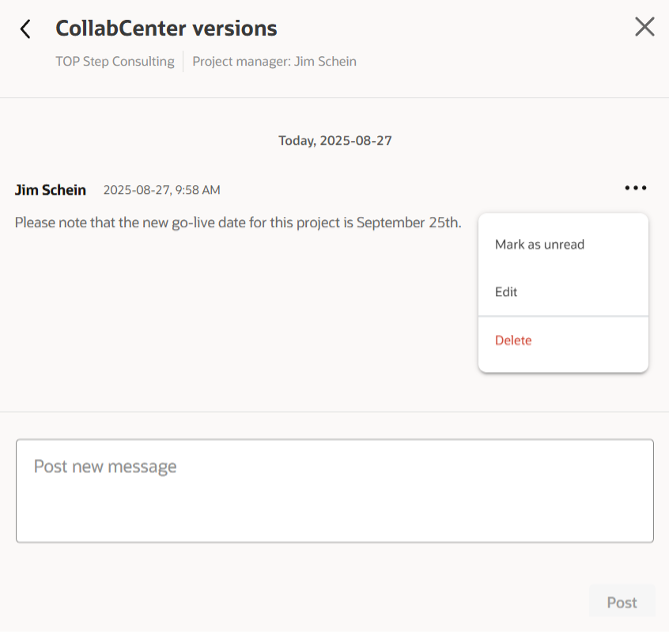
Strategic Use Cases for Project Discussions
The Project Discussions feature supports numerous collaboration scenarios that can significantly improve project management effectiveness:
Project Planning and Structure
- Project methodology notifications: “This project will be managed using Agile methodologies with 3-week sprints”
- Scope clarifications: Documenting agreed-upon requirements and scope boundaries
- Resource planning updates: Sharing information about team composition changes
Ongoing Project Communication
- Status reporting: “Phase 1 deliverables completed ahead of schedule – moving to Phase 2 planning”
- Employee availability notifications: “I will be out the week of September 1st – please reassign my tasks to John”
- Risk alerts: “Client requested scope change that may impact timeline and budget”
- Questions and answers about project requirements: Creating a searchable knowledge base of project-specific decisions
Knowledge Management
- Knowledge sharing regarding specific project details or anomalies: Documenting unique challenges and their solutions
- Client preference documentation: Recording client-specific requirements and preferences
- Lessons learned: Capturing insights that can benefit future projects
Implementation Best Practices
Since the messages in Project Discussions are stored permanently (barring manual deletion), this feature serves as an excellent source of historical project information. Top Step recommends a structured implementation approach to maximize the value of this functionality:
Establish Clear Guidelines
- Dedicate discussions for specific purposes within your organization and ensure messages adhere to those purposes
- Define message categorization (status updates, questions, announcements, decisions)
- Set response time expectations for different types of messages
- Create guidelines for when to use discussions versus other communication channels
Organize for Efficiency
- Consider organizing discussions by project phase (planning, execution, closure) for larger projects
- Establish naming conventions for discussion topics to improve searchability
- Encourage descriptive subject lines and clear, concise messaging
Leverage for Compliance and Auditing
- Use discussions to document decision-making processes
- Maintain records of scope changes and client communications
- Create an audit trail for project modifications and approvals
Integration Opportunities
Given Top Step’s extensive experience with OpenAir scripting and automation, organizations can consider enhancing Project Discussions through:
- Custom notifications that alert team members to specific types of discussion activity
- Integration workflows that trigger actions based on discussion content
- Automated reporting that pulls discussion insights into project dashboards
Measuring Success
To ensure Project Discussions are delivering value, consider tracking:
- Response times to project questions
- Reduction in email volume for project communications
- Team satisfaction with project communication clarity
- Time saved in project knowledge transfer
Conclusion
The Project Discussions feature represents a significant step forward in project collaboration within SuiteProjects Pro. By providing a centralized, persistent communication platform, it eliminates information silos and creates a valuable knowledge repository that benefits both current project execution and future project planning. When implemented with clear guidelines and strategic purpose, Project Discussions can transform how teams collaborate and manage project knowledge.
Organizations looking to maximize their return on investment in SuiteProjects Pro should consider Project Discussions as more than just another communication tool. It’s a strategic asset for improving project outcomes and building institutional knowledge that drives long-term success.

