
SuiteProjects Pro: How to Delete Expense Report Attachments in Bulk
Once an Expense report is no longer in Open status, attachments can no longer be deleted directly. You would need to unapprove the report and delete the attachments one by one.
By using the Expense report attachment deletion wizard, you can delete attachments in bulk from either Approved or Reimbursed Expense reports.
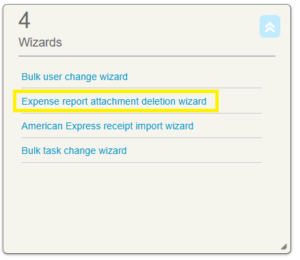
To use this feature, navigate to Dashboard > Home > under Wizard portlet, select Expense report attachment deletion wizard.
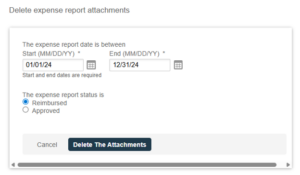
You need to specify the Start and End date of the expense report you need to delete the attachments and which status.
This is useful to free up space with your SuiteProjects Pro account by deleting the Expense report attachments that you no longer need or if you have already created a backup of the attachments outside the system.

