
Streamline Invoices with SuiteProjects Pro Custom Expense Groups
Group expense charges on invoices with the Custom Expense Item Groups feature setting in SuiteProjects Pro Invoice Layouts. This feature allows you to group expense charges with different expense items into custom groups to help condense and streamline the display of expense charges on an invoice.
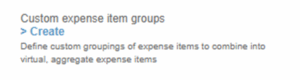
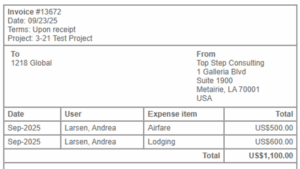
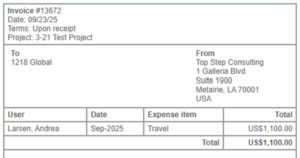
There are a multitude of use cases where combining expense charges and applying custom grouping can streamline the display of these charges on an invoice. As a simple example, you can group expense item charges for hotel and airfare into a custom expense item group displayed as one line on the invoice under ‘Travel’ vs having one line for hotel and a separate one for airfare.
Before combining charges & applying custom grouping:
After combining charges & applying custom expense item group called ‘Travel’:
To enable and use this feature:
1. In SuiteProjects Pro, go to Administration > Invoices > Invoice layouts
2. Create a new invoice layout or open the invoice layout you will apply this setting to.
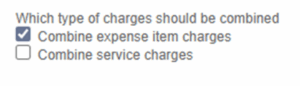
3. Scroll down to the ‘Combine Charges’ section of the invoice layout.
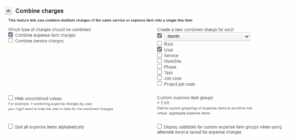
4. Check the ‘Combine expense item charges’ option (this will combine the expense charges together into one charge)
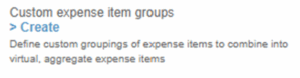
5. Click ‘Create’ under Custom expense item groups
6. From here you will enter the custom group name you would like to apply and select the expense item categories to be grouped under this custom group.
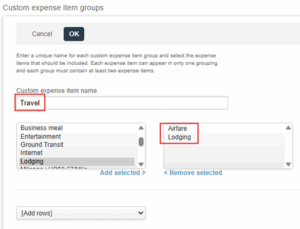
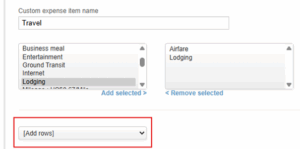
7. You can select the ‘Add rows’ drop down to create as many custom groups as needed to group various combinations of different expense item categories. Here we have grouped airfare and lodging as ‘Travel’, but as shown in the example below, you can also add additional groups as needed.
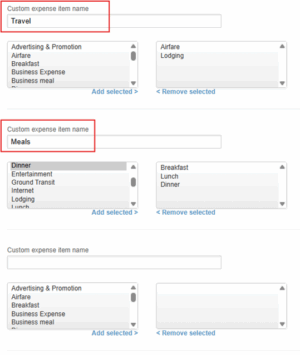
8. Click ‘save’ when all necessary custom expense item groups have been created and the changes will then apply to all invoices where the created/adjusted layout is applied.
An additional benefit of this feature is its applicability on a per-customer or per-project basis, facilitated by the use of client- or project-specific invoice layouts. This enables the establishment of distinct custom expense item groups across various clients or projects simply by generating diverse, supplementary invoice layouts. This capability affords significant flexibility in meeting customer invoice display requirements as needed.
This feature provides enhanced control over invoice presentation, leading to clearer, more succinct billing that can improve client comprehension and satisfaction. By utilizing Custom Expense Item Groups, organizations can customize their invoices to more accurately reflect their business services and expense invoicing structures.

