
Set Default Approvers on New SuiteProjects Pro Projects
If your team creates a high volume of new SuiteProjects Pro projects, you can save time and reduce setup errors by pre‑defining default Project Approval values on new projects. This ensures every new project starts with the correct approval structure — no more manual cleanup later.
Why it matters.
- Can ensure consistent approval routing across all new projects.
- Prevents missing or incorrect approvers on new project records.
- Standardizing improves reporting and downstream NetSuite integrations.
Where to set defaults.
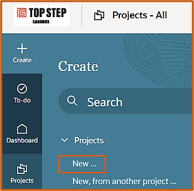
Navigate to Projects > All and click on +Create then on New to display the Project form.
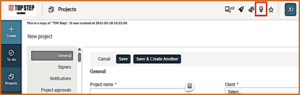
Click on the light bulb icon to access the Tips menu.
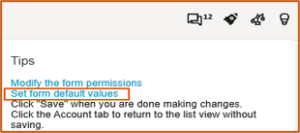
From the Tips menu, click the Set Default Form Values link to display the Project form.
On the Project form, scroll to the Project Approvals section and define the default approvers that populate automatically when someone creates a New Project. The default approver can be a specific User, an Approval Process, or a Metavalue.
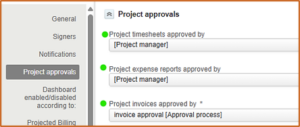
Recommended defaults to set.
- Default Timesheet Approver – Ensures timesheets route correctly even before the PM is assigned.
- Default Expense Approver – This is critical because SPP always routes Expense Reports to the Project-level Expense Approver first. Set this to a value that fits your workflow.
- Default Invoice Approver – Useful if your billing team wants consistent routing for project billing events.
Pro Tip
If you ever need different defaults when creating a new project, you can select the Projects > Create > New, from another project… link. Follow the same navigation above to display the Project form, and in the Duplicate phases and tasks from this project field select a Project or Project Template with the appropriate defaults.
Note – make sure to also check the box by Duplicate project approvers. The default approvers from the project or template you selected will be used for this new project.

