
NetSuite Connector – Using ‘Initial Only’ with an Advanced Mapping
In the NetSuite Connector, the ‘Initial only’ check box is located on the mapping definition table for integration workflows importing records from NetSuite into SuiteProjects Pro (Mapping tab). To enable ‘Initial only’, check the box to tell integration that the mapping definition row should be used only the first time a record is imported from NetSuite into SuiteProjects Pro (i.e., only when the SuiteProjects Pro record is created).
For Direct Field to Field Mapping
In the example below, we are telling integration to set the SuiteProjects Pro user to Not Active when first created, and to never update the user’s Active status again when integration runs in the future. For a direct mapping like this, enabling ‘Initial only’ will ensure that the SuiteProjects Pro field is updated only when the user record is created.

For Field-to-Field Mapping using Advanced Settings
This next example, which maps a custom NetSuite project (entity) field to a SuiteProjects Pro custom dropdown Project field, uses advanced settings (the gear icon) and the advanced mapping #Listmap shown below the screenshot. We should still check ‘Initial only’ on the mapping row, but an additional step is required for this advanced mapping to be initial only.
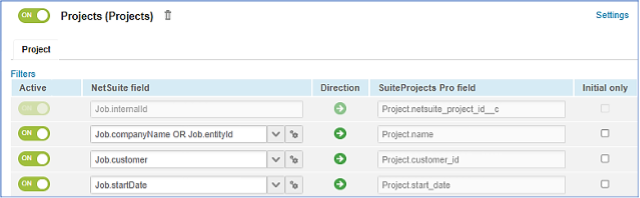

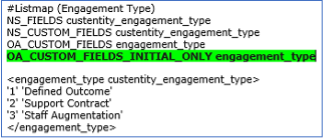
The Additional Step – In addition to checking the ‘Initial only’ box, your advanced mapping must also include an OA_CUSTOM_FIELDS_INITIAL_ONLY statement, or an OA_FIELDS_INITIAL_ONLY statement if mapping to a standard field.
That’s all for now! We hope you find this information useful as you to continue to use NetSuite SuiteProjects Pro.

