
Introducing the All-New To-Do Widget in SuiteProjects Pro Mobile 5.3
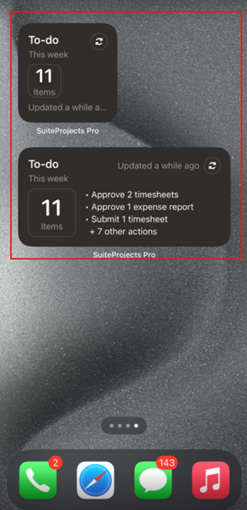
The latest release of SuiteProjects Pro Mobile 5.3 introduces the new To-Do Widget, giving you instant visibility into your action items—right from your mobile app dashboard or your device’s home screen. Stay on top of approvals and tasks in SuiteProjects Pro without needing to open the app.
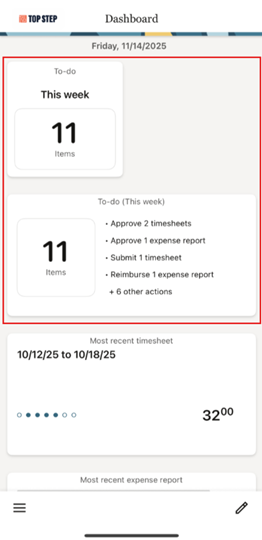
To add and use the new To-Do widget in app, follow the steps below:
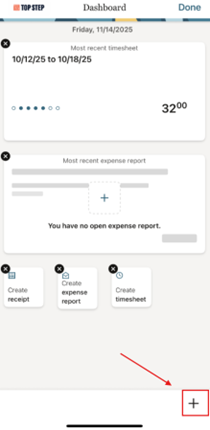
1. Tap the pencil icon on the lower right part of the mobile app > The + New Widget icon should appear on the same location, tap the + New Widget icon
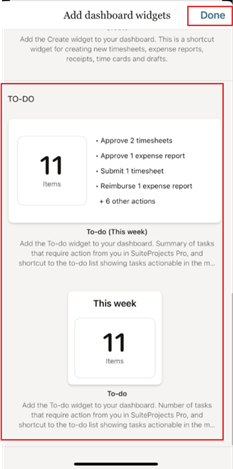
2. Once the Add dashboard widgets form appears, jus tap on the To-do widgets you want to add > Tap Done
To add and use the new To-Do widget in your device’s homescreen, follow the steps below:
1. Edit your homescreen and click Edit > Click Add Widget
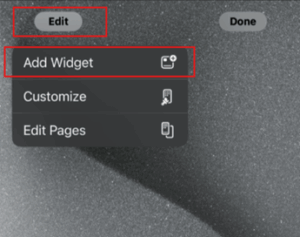
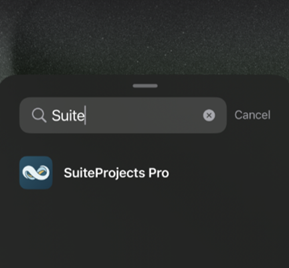
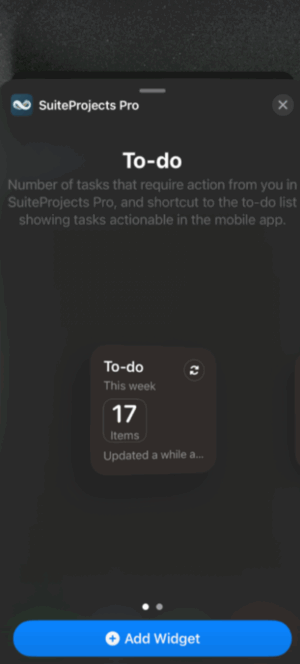
2. Search for SuiteProjects Pro > Select the To-do widget that you want to add > Click + Add Widget button
Additional notes:
Do not forget to enable the “Enable Approvals on Mobile apps for Timesheets” and “Enable Approvals on Mobile apps for Expenses” settings on your user record to be able to approve/reject timesheets and expenses on Mobile apps using To-do list.
Current limitation of the the To-do list in SuiteProjects Mobile 5.3 is that you can only complete actions related to object types that are available and that you have access to in SuiteProjects Pro Mobile. You can still see other object types on the to-do list but can’t do anything with it. Currently, expense reports and timesheets are the only objects available. You will see the message below if you try to click on object types that is not available in the mobile app:
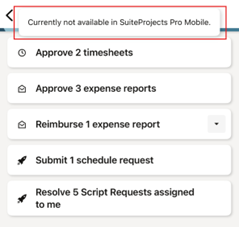
To complete actions related to other object types like time off, reimbursements and script request, use the SuiteProjects Pro web UI.

