
How to Utilize the Time Period Cap Option on Time Billing Rules in SuiteProjects Pro
When delivering services with both a Fixed Fee and Time & Materials component, the Fixed Fee portion will often cover only a certain number of hours per week or month.
In addition to the Fixed Fee billing rule, create the following Time Billing Rules for your project:
First, create a Time Billing Rule using a $0/hr Rate Card with the appropriate number of hours in the Time Period Cap section. Be sure to check the box to Move any capped hours to the next billing rule.
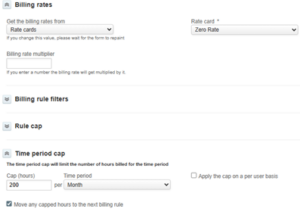
Then create another Time Billing Rule with the appropriate Rate Card and set the position to follow the first Time Billing Rule.

This ensures only the hours beyond the agreed upon cap will be invoiced at an hourly rate.

