
How to Use Permission Rules to Limit Values in Form Fields Using SuiteProjects Pro
SuiteProjects Pro provides many options and features to help you customize and manage your users’ experience with the tool. At times, it may be necessary to configure a form so that only specific values are allowed—or disallowed—in designated fields.
By using a feature called permission rules, you can customize both the look and functionality of many different forms in multiple ways. Permission rules are available anywhere you have the option to edit form permissions.
In this example, the business wants to enforce the use of a specific rate card whenever a billing rate multiplier is selected on a Time Billing Rule form.
Example:
- Billing Rate Multiplier field sets hourly rate: $196/hr
- Billing Rate Multiplier = 196
- Rate Card: Only the “$1 Rate Card” option should be available
To enforce the use of the chosen rate card, we will create a permission rule that limits the available values in the Rate Card field whenever the Billing Rate Multiplier field is populated with any value greater than “0.”
Important Steps
These steps reference the Time Billing Rule form specifically, but the same process applies to any forms that support permission rules.
- First, navigate to a new time billing rule form: Project > Create > Time billing rule
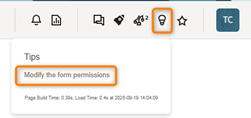
- From the tips menu, select Modify form permissions
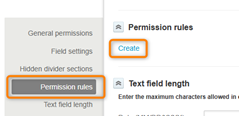
- Click on Create in the Permission rule section
- Add a name, set the condition to Billing rate multiplier [not equal to] blank/zero
- Perform action = Limit values, then select Rate card from the Available field and move it to the Selected field
- *Important – Click on the Rate card value in the Selected field to reveal the Rate card values in the Limit values field.
- Now, select the $1 Rate Card value and add it to Selected
- Click Save here and on the next (Form permissions) form.

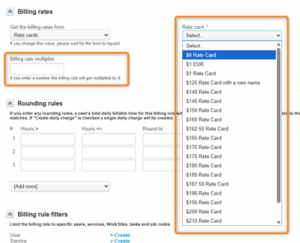
Now, if the Billing Rate Multiplier is blank or set to 0, all of the active rate card values are available.
However, if the Billing Rate Multiplier field is used, the Rate card field limits your options to the $1 Rate Card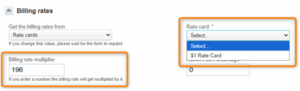
Check with your SuiteProjects Pro administrator if you don’t see these options available to you. Certain role restrictions may prevent a user from seeing all these features.

