
How to Include Inactive Projects in SuiteProjects Pro Crosstabbed Reports
When running a Crosstabbed report for Projects in SuiteProjects Pro the report will omit Projects that don’t have any activity.
It’s possible to trigger the system to include a Project by creating a custom calculation for the project Budget.
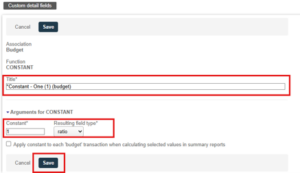
In order to create the Budget custom calculation, we first need to create a Constant.
Steps to create a Constant:
- Go to Administration >Global Settings>Reports>Custom Calculations>Custom detail Fields
- Click on the universal Create>New>Budget custom detail field
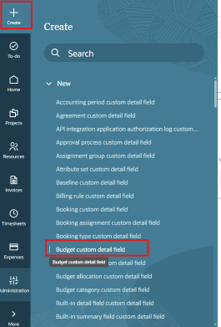
- Populate the fields:
Steps to create a Custom Calculation:
- Navigate to Administration >Global Settings>Reports>Custom Calculations
- Click on the universal Create>New>Account-wide Custom Calculation
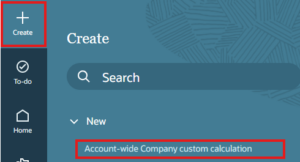
- Populate the fields:
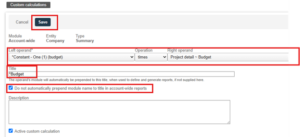
Add the custom calculation to your crosstabbed report.

