
How to Automatically Add a NetSuite Link to Newly Exported SuiteProjects Pro Projects
It’s common for SuiteProjects Pro to be integrated with NetSuite using the native connector. One frequent frustration for users is having to switch between systems and spend time locating the corresponding project in NetSuite. By adding a link to your project properties in SuiteProjects Pro, you can give users a quick, direct way to navigate to the project in NetSuite.
Note: You will need to an administrator in Suite Projects Pro to fully set this up
Create a URL Custom Field
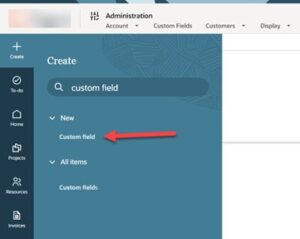
The first step is to create a field where you can store the link. Click the Create button in the top left corner and search for Custom Fields.
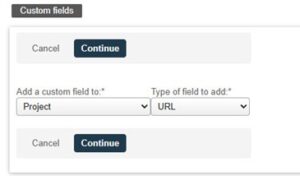
Add the custom field to Project and choose the URL type.
Give the field a Field Name and Display Name. For this example, we will be using ‘netsuite_url’ and ‘NetSuite URL’ respectively.
Identify your NetSuite Account ID
The next step is identifying your NetSuite account id. If your NetSuite connector is already set up, you can find it in the Credentials section. From the lefthand menu in SuiteProjects Pro, navigate to Administration > NetSuite Connector. Choose the Credentials tab.
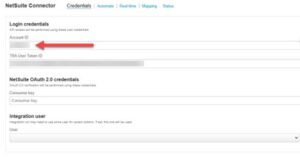
If your connector is not set up yet, you can also find your id by logging into NetSuite. Your account id will be the first numbers in the URL:
- Example: https://1234567.app.netsuite.com/app/center/card.nl?sc=-29&whence=
Add a Mapping to the NS>SPP Projects Update
From the lefthand menu in SuiteProjects Pro, navigate to Administration > NetSuite Connector. Choose Mappings, then the Projects chapter with the left-to-right arrow (this is for NS>SPP). Add a mapping row.
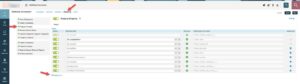
Normally you would map to an existing field, but for this one, we will be adding an advanced mapping. Click the gear icon on the new mapping row.
In the box that pops up, copy in the code below, making sure to replace the NetSuite account id below with your NetSuite account id.
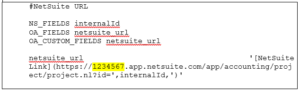
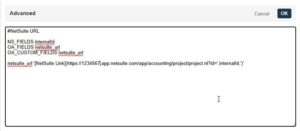
Click OK, and remember to click Save at the top!
In Use
Now, when a project is first exported to NetSuite, or when an update is sent from NetSuite to SuiteProjects Pro, the URL will be written back to your new field on your project.

