
Global Search in SuiteProjects Pro – You’ll Be Glad You Found It!
Today we want to shine a spotlight on a relatively new SuiteProjects Pro feature – Global Search. Like the Search bar at the top of the page in NetSuite that provides quick access to a wide range of information, the SuiteProjects Pro Global Search feature lets you search for and quickly go to any of the create actions, lists, tools, and administration settings pages in SuiteProjects Pro. And it lets you search for (and access) a customer, project, employee, or resource without using navigation or menus.
To access Global Search, click the red search icon  in the upper-right corner or press ‘S’ on your keyboard.
To leave the global search page, click the ‘X’ icon in the upper-right corner or press ‘Esc’ on your keyboard.
The global search page has the following components:
Suggestions and Shortcuts – initially show navigation suggestions based on typical system usage, and your navigation shortcuts side-by-side. These are replaced with search results when you start entering a term in the search bar.
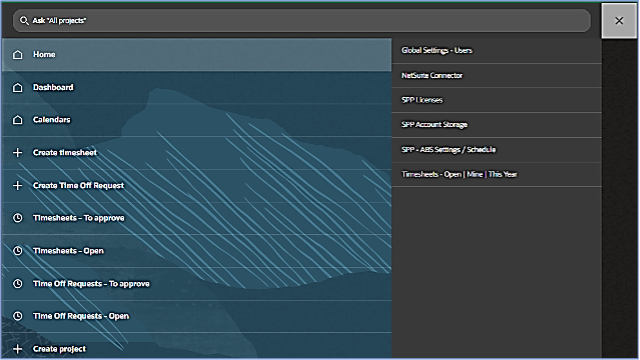
Search – find what you’re looking for using your own language and terms without using navigation or menus. This is a huge time saver, and we believe it will quickly become one of your favorites and most used features.
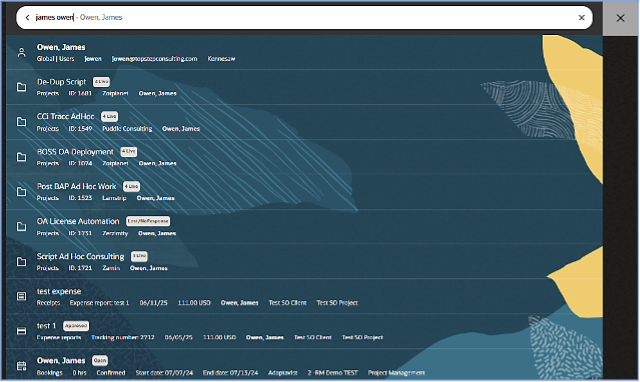
Just enter a term or phrase in the search bar, and matching results are shown as you type. Parts of the search result entry that match or closely match your search phrase are displayed in bold font. Click a search result entry to go to the corresponding page.
In the example below, I have searched for my name. Global Search displays results for user Owen, James. The first result is the closest match and is in bold font. Now for the best part. Without using navigation or menus to access my User record I just click on the search result, and I am taken directly there. No navigating to Administration, then Global Settings, then Users, then finding and clicking on the user record in a list. Big time saver!
The Global Search feature was enabled by default for all accounts with the 2024.2 upgrade. Account administrators can control global search settings and perform maintenance tasks, like synchronizing object data to update the information available in global search results and extending global search coverage to additional object types when they become available in future releases.
To learn more, visit SuiteAnswers | Answer ID 109851 Getting Started with Global Search.
That’s all for now! We hope you will find this information helpful as you to continue to use NetSuite SuiteProjects Pro.

