
Enhance Rejection Notifications: Include Rejection Notes in SuiteProjects Pro Emails
When an approver rejects a transaction in NetSuite SuiteProjects Pro—such as a timesheet, expense report, or invoice—clear communication about why can dramatically improve the resubmission process. By including the rejection reason directly in notification emails, you help users quickly understand the issue, make corrections, and resubmit their transactions without unnecessary back-and-forth communication.
This simple configuration change can significantly enhance your workflow efficiency and user experience.
How to Configure Rejection Notes in Email Notifications
Follow these straightforward steps to include rejection reasons in your custom notification emails:
- Navigate to Administration > Application Settings > [Select the relevant application] > Notifications
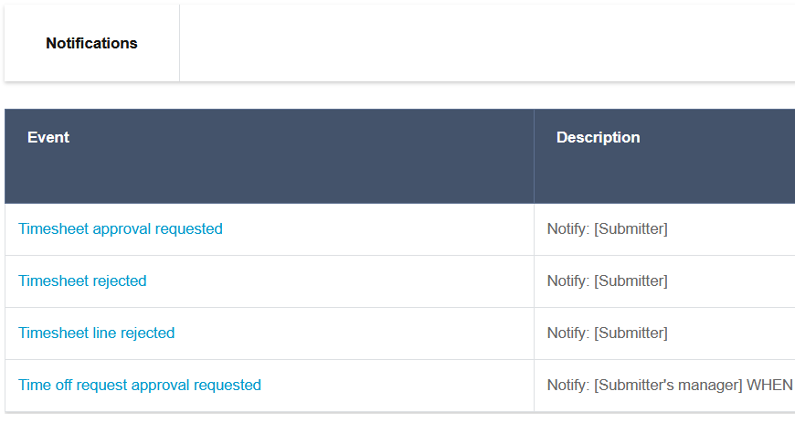
2. Locate and edit the appropriate Rejected email notification template
3. In the Email Body section, place the following token where you want the rejection reason to appear:
%%rejection_reason%%
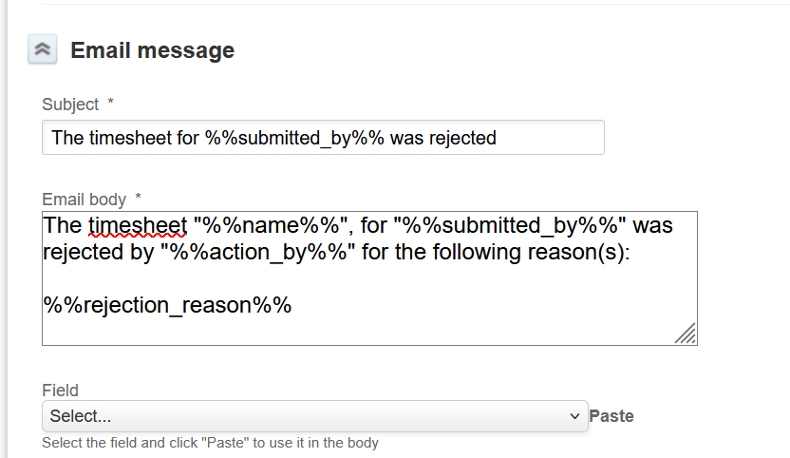
4. Save your changes
Benefits of This Implementation
- Improved clarity: Users immediately understand why their submission was rejected
- Faster corrections: Eliminates the need for separate communications about rejection reasons
- Streamlined workflow: Reduces resubmission cycles and approval delays
- Greater user satisfaction: Creates a more transparent and user-friendly system
Pro Tip: After updating your notification templates, send a test rejection or monitor the next few real rejections to verify that the reason displays properly in the notification emails.

