Enabling Bulk Actions on Planner in SuiteProjects Pro
The SuiteProjects Pro Resource Booking Planner is a powerful tool that lets you create and modify resource bookings in a user-friendly and dynamic interface. One of the most useful features of this tool is that it allows you to create, modify, or delete bookings in one screen.
Enabling Bulk Actions in the Resource Booking Planner allows you to make changes to several bookings at one time, saving clicks (and time!) in the process.
Enabling the feature
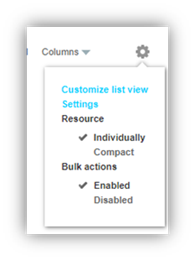
Some users may not see the Bulk actions feature when they are using the Resource Booking Planner. There are a couple of reasons this may be the case. The first is that the feature may not be enabled on your Resource Booking Planner page. To check, find the Settings drop-down menu () when you are in the resource-first view, make sure that Bulk actions is set to “Enabled”:
The second reason is that your role may not permit them to make changes using this feature. If you think this feature is not enabled for your role contact your SuiteProjects Pro administrator and ask them. The settings to look for are:
- Create and modify bookings in the resource planner = checked
- Disallow the use of bulk actions in resource planner = un-checked
Using Bulk Actions
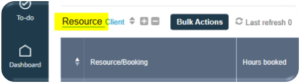
To use the Bulk Actions feature, make sure that you are in the Resource-first view:
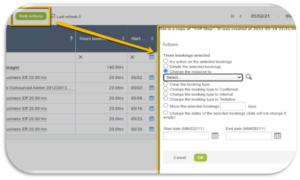
Check the box next to the booking(s) you wish to update, then click on the Bulk actions button. This will open a menu with your bulk action options, which include:
- Delete the selected booking(s)
- Change the resource associated with the booking(s)
- Clear the booking type
- Change the booking type
- Move the bookings a specific number of days (this shifts the bookings forward the number of days entered, and adjusts the start/end dates accordingly)
- Change the start and end dates of the bookings (overrides the dates on the booking record)