
Temporarily Prevent SuiteProjects Pro Users from Submitting Timesheets
During certain migration tasks, we need to temporarily prevent users from submitting timesheets in SuiteProjects Pro. However, users should still be able to access the Timesheets Module to view existing timesheets and time entries or create new timesheets.
We just need to prevent open timesheets from being submitted until the migration work is complete.
We can do this with SuiteProjects Pro’s built-in features, by completing the steps below.
Navigate to Administration > Application Settings > Timesheets then click on Timesheet Rules or
Click on the Global Search Icon  , type ‘Timesheet Rules’ then click on it in the search results.
Now that you are on the Timesheet Rules page, in the Submission rules section go the Minimum number of hours required on the timesheet rule.
Note – before making changes, save a screenshot with the rule’s current settings so you can reinstate them when ready to allow users to submit timesheets again.
Make the changes below to the Minimum number of hours required on the timesheet rule:
- In the Hours/Percent field, choose Fixed hours.
- In the Value field, enter an absurdly high number of hours (500 in our example).
- In the Action field, choose Error.
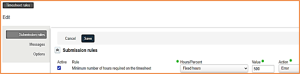
Save your changes.
After saving these updated settings, you will be able to prevent your SuiteProjects Pro users from submitting a timesheet. If someone does try to submit a timesheet, they will get the error below stating that their timesheet does not have at least five hundred hours (and no timesheet ever would).

Timesheet submission remains suspended until you are ready for it to resume.
To allow users to submit timesheets as they did before, just return to the Timesheet Rules page and set the Hours/Percent, Value, and Action fields on the Minimum number of hours required on the timesheet rule to their previous values.
Save your changes.