
Access the SuiteProjects Pro Data Dictionary Instantly with the Shortcuts Feature
If you’ve worked in SuiteProjects Pro for any length of time, you’ve likely relied on the Data Dictionary. It’s packed with essential reference information that helps you configure, customize, and fine-tune your account to better support your business needs. Because it’s such a valuable resource, quick access matters. This tip shows you how to use the Shortcuts feature to keep the Data Dictionary just one click away.
This tip will show you how the Shortcuts feature can make it super easy to access the data dictionary.
To start, we need to see if the Shortcuts feature is enabled in your account. If it is, you will see a star by your initials on the Home Page. If you don’t see that star, you can enable the feature by going to Administration > Global Settings > Account > Optional features and checking Enable shortcuts.

With Shortcuts enabled, now we can create a shortcut to the Data Dictionary in just a couple of steps.
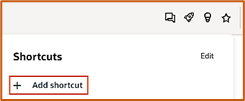
- In the menu above, click on the star to Open shortcuts. Then click on + Add shortcut.
- Select External URL, enter a name for your Shortcut, enter the link to the data dictionary:
- https://www.netsuitesuiteprojectspro.com/database/single_user.htmlThen click Save.

